A backtesting tool for Python, FX and stocks
Why did your trading rule win, and why did it lose?
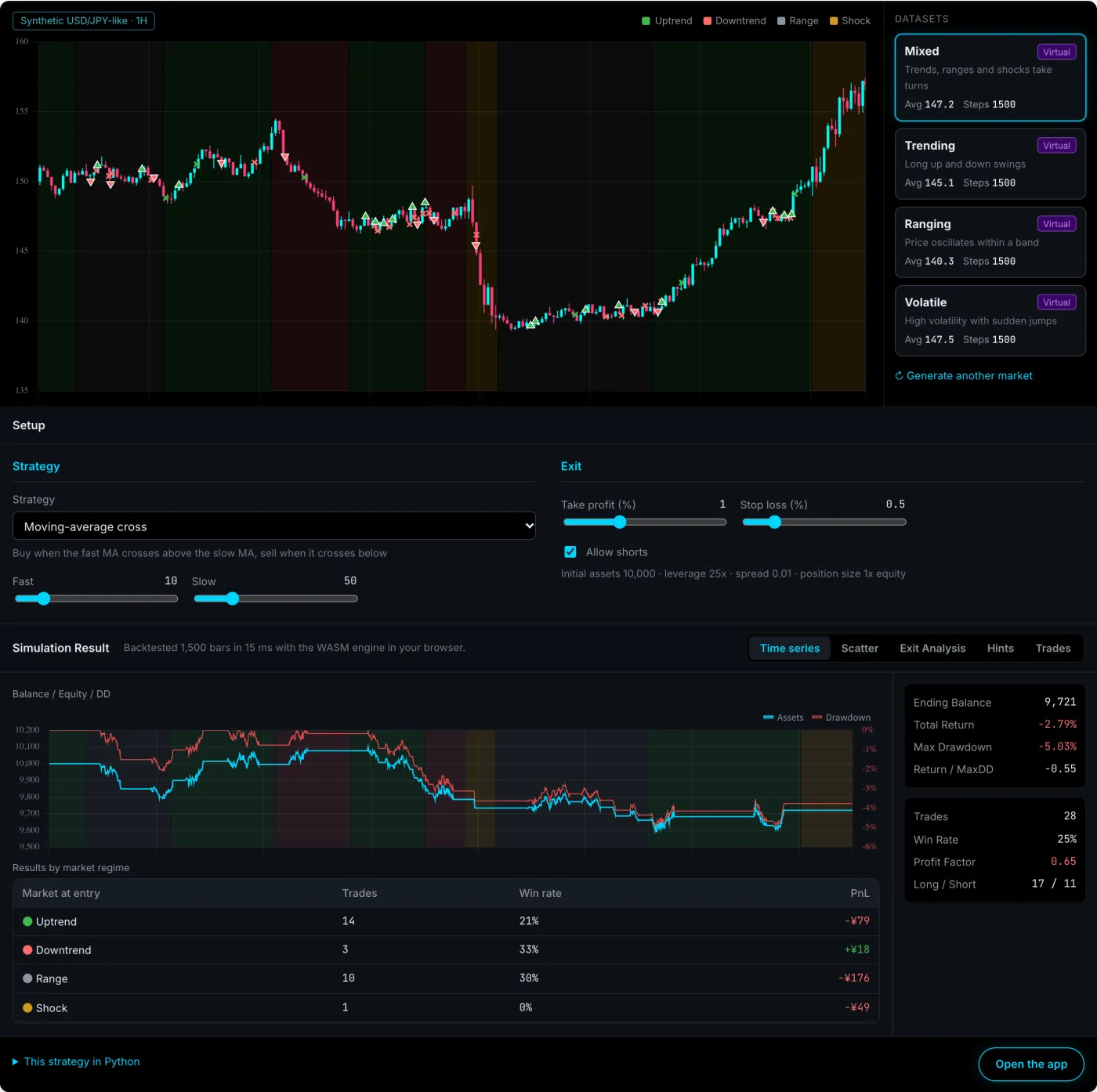
Hawk Backtester doesn't stop at the total PnL. It breaks a backtest down by market regime and by individual trade, with each trade's price excursions and exit reason, so you can see what to fix next.
- Nothing to install
- Strategy code stays on your machine
- Fill assumptions documented
Why the total isn't enough
Same −2.8%. Opposite fixes.
Two strategies can end with the same total and still need completely different changes. Tweak the take profit based on the total alone and you may be fixing the part that wasn't broken.
Strategy A: losers that were in profit first
−2.8%
- 15 of 21 losing trades were up at least 0.8% at some point
- They reversed before the target and hit the stop
Fix the exit (target, exit rules)
Strategy B: losers that went wrong right away
−2.8%
- 17 of 21 losing trades were never in profit
- Most losses came from entries in ranging markets
Fix the entry (conditions, which markets to trade)
Illustrative example. In Hawk Backtester you see this split in the trade list and the improvement hints.
What you get
A backtest that answers "why", not just "how much".
Results by market regime
Trades are grouped by the regime at entry (uptrend, downtrend, range, shock) with count, win rate and PnL for each. A rule that wins in trends and gives it all back in ranges is obvious at a glance.
Splitting results by regime →
Every trade, taken apart
Each trade records its maximum favorable excursion (MFE), maximum adverse excursion (MAE) and exit reason: take profit, stop loss or opposite signal. Click a hint and the trade list filters to the trades behind it.
MFE and MAE explained →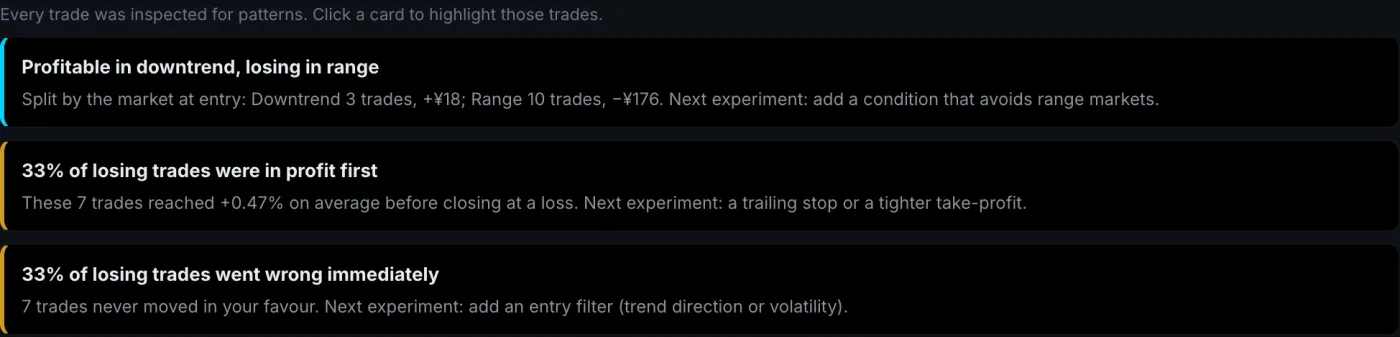
Diff against the previous run
Re-run after a change and the app shows which trades changed compared to the last run. Python strategy files re-run automatically when you save.
When I moved a take profit from 1% to 2%, the trade count stayed at 60 but 20 trades ended differently, and about half of those got worse. The total alone looked like "slightly better".
Backtesting in Python →Parameter sweep heatmap
Sweep two parameters and see the grid as a heatmap. The average of the best cell's neighbours sits next to it, so a lucky spike is easy to tell apart from a stable region.
Avoiding overfitting →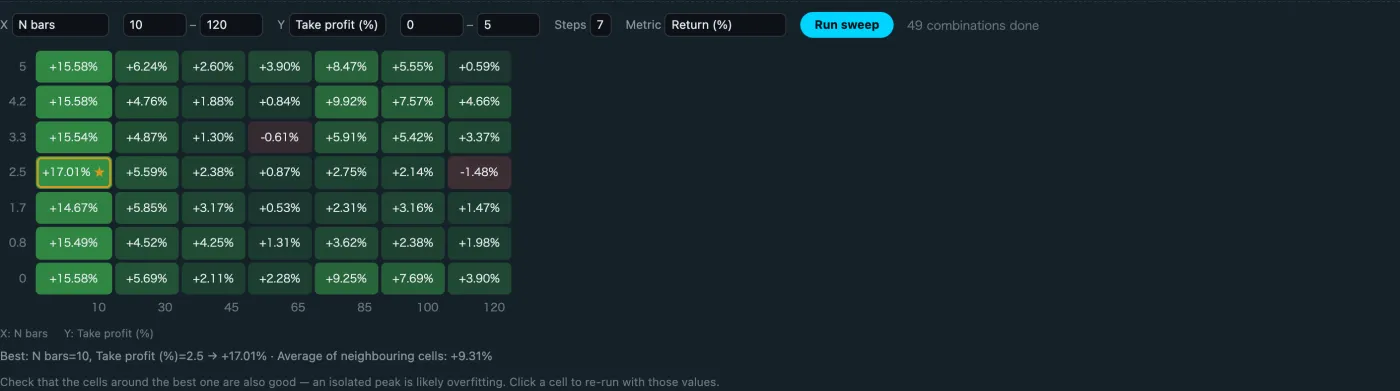
AI read-out
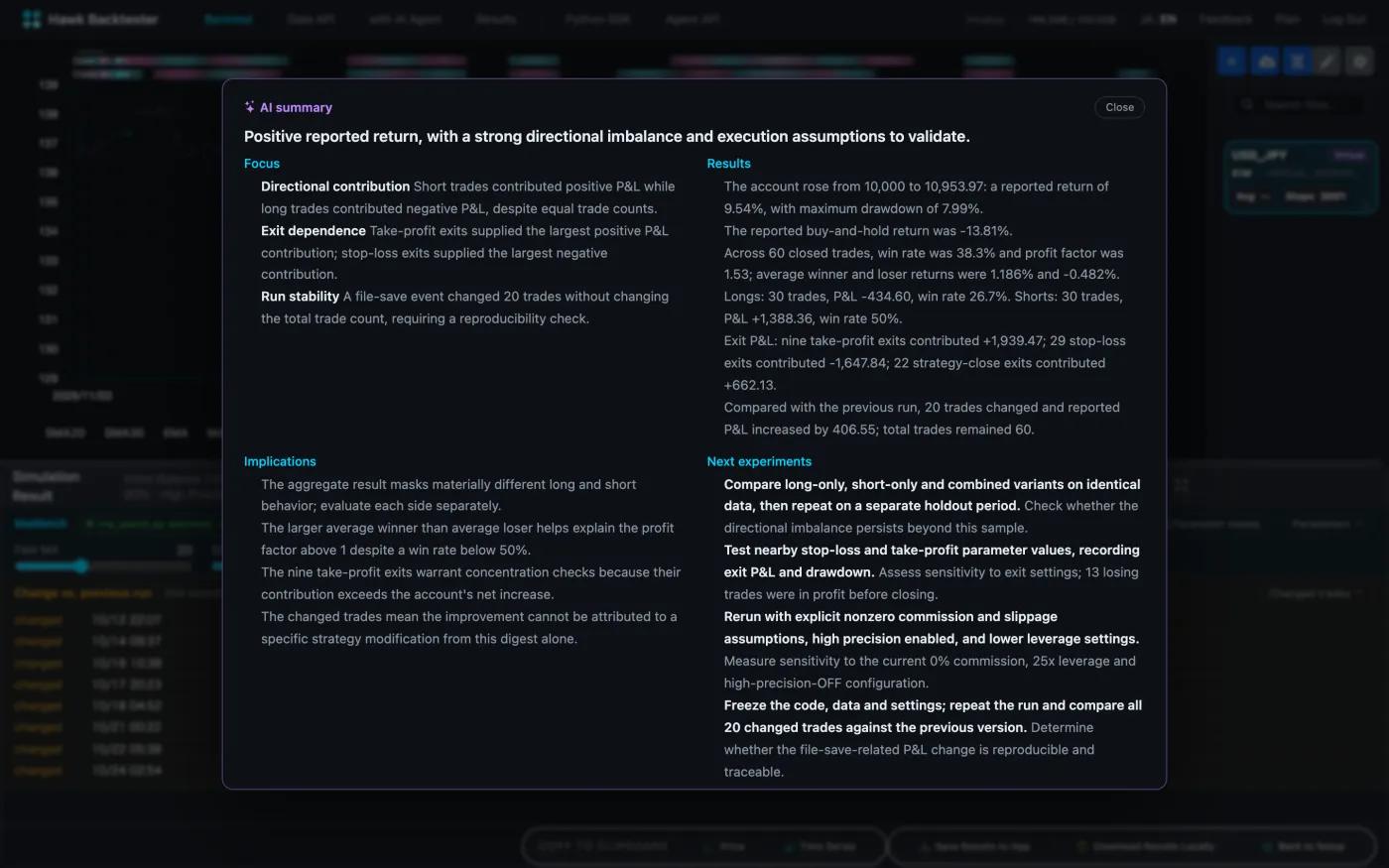
An LLM reads the aggregated numbers and tells you what to look at and what to test next. Only aggregates are sent, never your code or raw data, and it doesn't recommend trades.
Results you can check
Assumptions in the open. Your code stays yours.
Code stays on your machine
Python strategies run locally and talk to the browser over a local connection. Use any library you like, including GPUs and external APIs.
Fill model documented
I found four fill-model bugs in my own engine, and fixing them moved results by up to 4%. Since then gaps, TP and SL on the same bar, and spread handling are all documented.
Simulation model →Your data stays yours
Use a CSV, synthetic data, or your own data API key (Twelve Data, for example). Keys are stored encrypted and datasets are never shared between users.
Data API →How to use it
In the browser, or with your own Python.
Browser only
Tune built-in strategies (MA cross, breakout, Bollinger Bands, RSI) with sliders. Nothing to install.
Open the demo →Your own Python
Every Param becomes a slider in the browser. Moving it re-runs your local code with the new value.
pip install -U hawk-bt
hawk-bt run my_strategy.py
Python SDK docs →
From an AI agent
With the Agent API, coding agents such as Claude Code can write, run, analyse and iterate on strategies. Results come back as structured JSON. A paid, hands-on pilot is available if you want help setting it up.
Agent API docs →Comparison
Why not just use a free Python library?
backtesting.py, vectorbt and Backtrader are fast and flexible. Hawk Backtester puts the part after the computation, reading the result, on screen from the start. You still write strategies in Python.
| Typical Python library | Hawk Backtester | |
|---|---|---|
| Strategy language | Python | Python (or built-in strategies) |
| Results by regime | Write the grouping yourself | Built in |
| MFE, MAE, exit reason | Depends on the library, often computed by hand | Per trade, filterable from hints |
| Diff vs previous run | Save results and compare yourself | Re-runs on save, shows changed trades |
| Parameter sweep | Runs it, you draw the chart | Heatmap with neighbour average |
| Where code runs | Your machine | Your machine (never uploaded) |
| Cost | Free, open source | Free plan available |
What it can't do yet
- One instrument per backtest, no portfolios
- Bar data only, no ticks
- No bundled market data (CSV, synthetic, or your own API key)
- The app is built for desktop (the demo works on phones)
Pricing
Free to start
- Unlimited backtests on the free Trial plan
- 5 saved results, sweeps up to 25 runs, 3 AI summaries a month
- Paid plans raise those limits
FAQ
Frequently asked questions
Is it free?
Yes. The demo runs without an account, and the free Trial plan has unlimited backtests. Paid plans raise the limits on saved results and parameter sweeps.
Is my strategy code uploaded?
No. Your Python strategy runs on your own machine and talks to the browser over a local WebSocket. The strategy code itself is never sent to the server.
How is this different from backtesting.py or vectorbt?
Any of those libraries can do the computation. Hawk Backtester ships the analysis that explains why a rule won or lost: results by market regime, each trade's MFE and MAE, exit reasons, and a diff against the previous run. You still write the strategy in Python.
What data can I use?
Upload a CSV, generate synthetic data, or import OHLCV with your own data API key (Twelve Data, for example). Stocks, ETFs, FX and crypto bars are supported. No market data is bundled.
Can I backtest FX or stocks?
Yes. Any instrument with OHLC bars works, and you can set spread and fees. Today a backtest covers one instrument and uses bar data, not ticks.
Does it work on a phone?
The demo works on phones. The app itself is built for desktop, because it connects to Python running on your computer. Chrome on a PC is recommended.
How are fills modelled?
Take profit and stop loss fill at their level, or at the open when the bar gaps through. If one bar touches both, the stop is assumed first. You can enter at the signal bar's close or the next bar's open. The full model is documented on the simulation model page.
Do you give investment advice or signals?
No. Hawk Backtester is a tool for testing and analysing trading rules. The AI read-out explains the result and suggests what to test next. It does not recommend trades.
Guides
Reading backtest results
- How to backtest a trading strategy in Python, and how to read the resultWrite a trading rule in Python, run a backtest, and read more than the total PnL. Step by step with hawk-bt code examples.
- MFE and MAE explained: split losing trades into exit problems and entry problemsWhat maximum favorable excursion (MFE) and maximum adverse excursion (MAE) mean, and how to use them to tell whether a strategy needs a better exit or a better entry.
- How to avoid overfitting a backtest when you optimize parametersWhy the single best parameter set from an optimization tends to break on new data, and how to pick a stable region on a parameter heatmap instead.
- Backtest fill assumptions: gaps, TP and SL on the same bar, spreadFill assumptions can move backtest results by several percent. Gaps through a stop, TP and SL touched on one bar, spread and fees, and signal-bar vs next-bar entries.
- Split backtest results by market regime: trend, range and shocksThe same rule can win in trends and lose in ranges. How to break backtest results down by market regime to see what a strategy is actually good at.
- Choosing a backtesting tool: Python libraries, TradingView, MT5 or a browser appbacktesting.py, vectorbt, Backtrader, TradingView and the MT5 strategy tester compared by what each is good at, and what to check before you pick one.
Give it 30 seconds.
No signup, nothing to install. Move a slider and the results by regime update right away.
Try the demo