Choosing a backtesting tool: Python libraries, TradingView, MT5 or a browser app
The quickest way to choose a backtesting tool is by the language you want to write strategies in and where you want the test to run. backtesting.py, vectorbt and Backtrader suit people who want to write Python freely. TradingView suits quick tests on a chart. If you plan to automate on MT5, its own strategy tester is the natural choice. Whichever you pick, check its fill assumptions and how easily it lets you break the results down.
Decide these first
Before comparing feature lists, answer three questions.
- What will you write strategies in? Python, Pine Script, MQL or spreadsheet formulas.
- What are you testing? A rule on one instrument or a portfolio of many. Bar data or ticks.
- What comes next? Research only, or running the same code live.
If you plan to run an expert advisor on MT5, writing the test in MQL5 saves a port later. If you want to try thousands of parameter sets for research, a Python library is the better fit.
The main options side by side
| Tool | Language | Runs on | Good at | Watch out for |
|---|---|---|---|---|
| backtesting.py | Python | Your machine | Short code for a single-instrument strategy, with built-in result plots and parameter optimization | Not designed for multi-instrument portfolios |
| vectorbt | Python | Your machine (notebooks) | Testing very large numbers of parameter combinations quickly with array operations | The vectorized style takes time to get used to |
| Backtrader | Python | Your machine | Event-driven, bar by bar. Handles multiple data feeds and order types | Large parameter sweeps can be slow |
| QuantConnect (LEAN) | Python, C# | Cloud or local | Serious multi-asset research with a path to live trading | A big system with many steps for a small personal test |
| TradingView | Pine Script | Browser | Write a strategy on the chart and see the result right away | Everything stays inside Pine Script, so no Python libraries |
| MT4 / MT5 | MQL4 / MQL5 | Desktop app | The tested code runs live as an expert advisor. MT5 can also test on tick data | Test data comes from the broker you connect to |
| Excel / spreadsheets | Formulas | Desktop or browser | For simple rules you can follow every calculation by eye | TP/SL and overlapping trades get hard to model correctly |
| Hawk Backtester | Python, or built-in strategies | Browser (Python strategies run on your machine) | Results by market regime, per-trade MFE and MAE, exit reasons and a diff against the previous run, all on screen out of the box | One instrument per test, bar data only, no bundled market data |
Any of these can compute the same strategy. The differences are how easy it is to write, how fast it runs, and how far you can break the result down.
If you go with a Python library
Many Python libraries are free, and they plug straight into pandas, NumPy and machine learning libraries. Flexibility is the main reason to use them.
The cost is that much of the analysis is yours to build. You will get total return and drawdown, but questions like "are my losers an exit problem or an entry problem?" or "how does this rule do in trends compared with ranges?" mean aggregating the trade list and plotting it yourself. The basics are in how to backtest in Python.
If you go with a charting or trading platform
TradingView and MT4/MT5 are connected to where you already trade. You can try an idea on the chart in minutes, and on MT4/MT5 the same code can trade live.
The thing to check is how they treat price movement inside a bar. What fills first when one bar touches both take profit and stop loss, or what happens when a bar gaps through a stop, depends on settings and test modes. Look at the fill assumptions before trusting the numbers.
Five things to check in any tool
- No look-ahead. How the signal bar relates to the fill bar.
- Fill rules. At what price TP and SL fill, and what happens on gaps or when both are touched in one bar.
- Costs. Spread, fees and slippage on both entry and exit.
- Breakdown. Whether you can see each trade's path and exit reason, not just the total.
- Parameter sensitivity. Whether results hold up when a value moves a little. See avoiding overfitting.
Who Hawk Backtester is for
I built Hawk Backtester for the moment when a backtest gives you a number but not the reason behind it. It does not try to compete with the bigger tools above on speed or asset coverage.
- The no-signup demo runs built-in strategies (MA cross, Donchian breakout, Bollinger Bands, RSI) entirely in the browser.
- Your own strategies are Python. The code runs on your machine and is never uploaded.
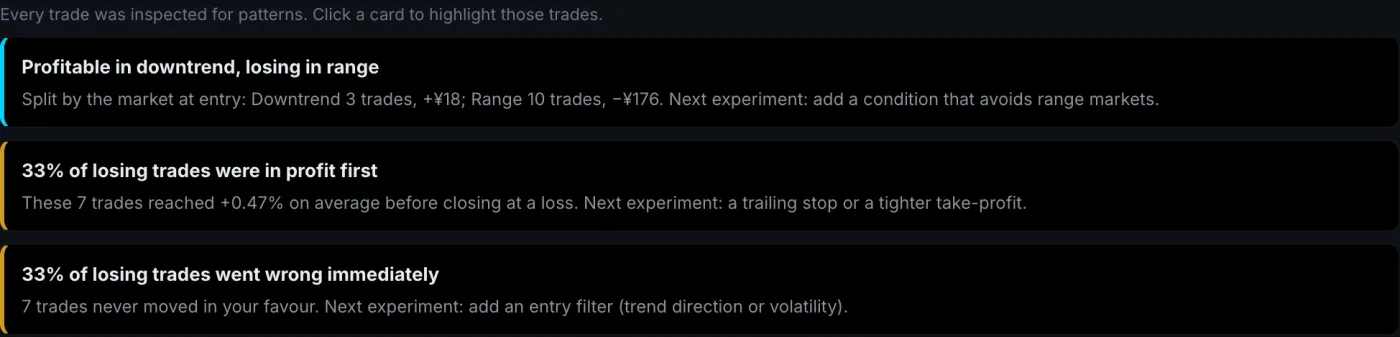
- Results by market regime, each trade's best open profit and worst open loss, exit reasons and hints generated from the trades are on screen from the start.
- Saving your strategy file re-runs it and shows which trades changed compared with the previous run.
The limits, plainly: one instrument per backtest, no portfolios, no tick data. No market data is bundled, so you upload a CSV, generate synthetic data, or import with your own data-provider key such as Twelve Data. The app is built for desktop; on a phone only the demo really works. Pricing is on the plans page, and the free plan has no limit on the number of backtests.
FAQ
Are there free backtesting tools?
Yes. Open-source Python libraries such as backtesting.py, vectorbt and Backtrader are free to use. TradingView and MT4/MT5 also include backtesting you can use without paying. Hawk Backtester has a free plan too.
Where should a beginner start?
If you have never programmed, start with a charting tool's tester or a no-signup demo to get a feel for what a backtest tells you. If you can write Python, a compact library like backtesting.py is a good way to understand how backtests work.
Why do different tools give different results for the same strategy?
Mostly fill assumptions, costs and data. Entering at the signal bar's close or the next bar's open, or deciding which of TP and SL came first inside one bar, can move results by several percent.